Friday, July 20, 2012

Friday, June 29, 2012
Attribute Editor POP
I found an issue with maya ( i think in 2011) that the attribute editor, when torn off, can fall behind other maya windows. Using cntrl + a to call the attribute editor, would not actually pop it fwd, due to it only opens the attribute editor. So if the attribute editor is already open, it doesn't do anything.
to fix this I changed how cntrl+a works.

so I took the original hot key information, and commented out the two extra lines that are supposed to "raise" the attribute editor, and made it into a hot key.
AttributeEditor;
//toggleUIComponentVisibility "Attribute Editor";
//if(`isAttributeEditorRaised`){if(!`isChannelBoxVisible`){setChannelBoxVisible(1);} else {raiseChannelBox;}}else{openAEWindow;}
hth
-=s
to fix this I changed how cntrl+a works.
so I took the original hot key information, and commented out the two extra lines that are supposed to "raise" the attribute editor, and made it into a hot key.
AttributeEditor;
//toggleUIComponentVisibility "Attribute Editor";
//if(`isAttributeEditorRaised`){if(!`isChannelBoxVisible`){setChannelBoxVisible(1);} else {raiseChannelBox;}}else{openAEWindow;}
hth
-=s
Wednesday, June 27, 2012
Thursday, May 10, 2012
Modern Day "monkey" rig for 3D for $750
Qumarion mannequin input device for intuitive 3D manipulation
http://www.diginfo.tv/v/12-0070-r-en.php
DigInfo TV - http://diginfo.tv
Not exactly a "new" idea, but still interesting to see it coming back.
http://www.vertexia.com/Hot_Mix_18/vendors/aw/AW_Conductors/pages/conductors/pages/monkey/includes/monkey2.pdf

Wednesday, April 4, 2012
Thursday, December 15, 2011
Tip # 272 - resetting pan zoom
A lot of people don't even like Maya's pan/zoom tool in the first place, I often recommend to shut it off in the camera settings.
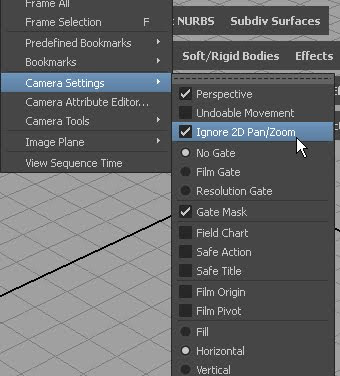
this also allows you to do have two panels up of the same camera, and see a green square around the area you are "zoomed" into, which can be helpful.
However, someone recently asked "How do I reset the pan/zoom "
which I realized i had no idea, so I looked it up.
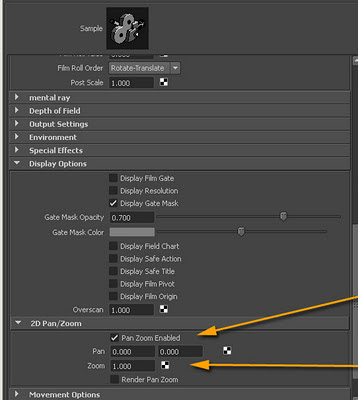
its under the attribute Editor of the camera,
open the tab for Display Options ,
and then open the tab under that for 2D Pan/Zoom
if you set the Pan to 0 0 and the zoom to 1 it will go back to its default , or no pan and no zoom.
this is something that may come in handy as a script, so.....
here is a little mel snippet you can paste on your shelf..
{

this also allows you to do have two panels up of the same camera, and see a green square around the area you are "zoomed" into, which can be helpful.
However, someone recently asked "How do I reset the pan/zoom "
which I realized i had no idea, so I looked it up.

its under the attribute Editor of the camera,
open the tab for Display Options ,
and then open the tab under that for 2D Pan/Zoom
if you set the Pan to 0 0 and the zoom to 1 it will go back to its default , or no pan and no zoom.
this is something that may come in handy as a script, so.....
here is a little mel snippet you can paste on your shelf..
{
string $panel = `getPanel -wf`;
string $camera = `modelEditor -q -cam $panel`;
setAttr ($camera + ".horizontalPan") 0;
setAttr ($camera + ".verticalPan") 0;
setAttr ($camera + ".zoom") 1;
}
//-----------end --------------
Wednesday, December 14, 2011
better turning particles...
I havn't tried this yet,, but it looks interesting....
this code was suggested by Eric Cloutier on cgtalk to make better turning particles. ive added a simple adjustment dividing the turn by the goalPP. the results are pretty acceptable. i think i see flipping occassionaly but not too much
the suggested code is listed here
forums.cgsociety.org/showthread.php?p=7186073#post7186073
and repeated here for reference with my adjustement....466 is my maxCount of particles which im using to get a percentage value for goalPP
creation:
nParticleShape1.customAim = ; //or whatever
nParticleShape1.goalPP=nParticleShape1.particleId/466+.4;
after dynamics:
float $maxTurn = 0.1;
vector $curAim = nParticleShape1.customAim;
vector $vel = nParticleShape1.velocity;
vector $newAim = ;
nParticleShape1.customAim = $newAim/nParticleShape1.goalPP;
this code was suggested by Eric Cloutier on cgtalk to make better turning particles. ive added a simple adjustment dividing the turn by the goalPP. the results are pretty acceptable. i think i see flipping occassionaly but not too much
the suggested code is listed here
forums.cgsociety.org/showthread.php?p=7186073#post7186073
and repeated here for reference with my adjustement....466 is my maxCount of particles which im using to get a percentage value for goalPP
creation:
nParticleShape1.customAim = ; //or whatever
nParticleShape1.goalPP=nParticleShape1.particleId/466+.4;
after dynamics:
float $maxTurn = 0.1;
vector $curAim = nParticleShape1.customAim;
vector $vel = nParticleShape1.velocity;
vector $newAim = ;
nParticleShape1.customAim = $newAim/nParticleShape1.goalPP;
Subscribe to:
Posts (Atom)